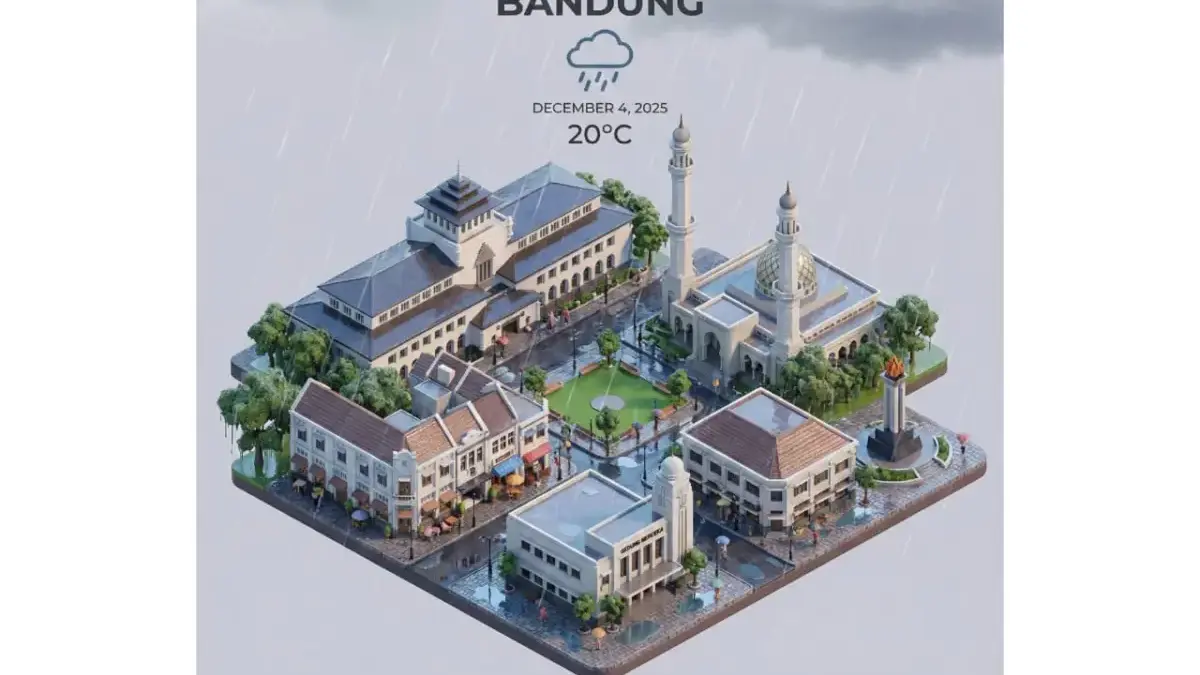
The scene features soft, refined textures with realistic PBR materials and gentle, lifelike lighting and shadow effects. Weather elements are creatively integrated into the urban architecture, establishing a dynamic interaction between the city’s landscape and atmospheric conditions, creating an immersive weather ambiance.
Use a clean, unified composition with minimalistic aesthetics and a soft, solid-colored background that highlights the main content. The overall visual style is fresh and soothing.
Display a prominent weather icon at the top-center, with the date (4 Desember 2025) and temperature range (20 °C) beneath it. The city name (BANDUNG) is positioned directly above the weather icon. The weather information has no background and can subtly overlap with the buildings.
The text should match the input city’s native language.
Cara Edit Kartu Prakiraan Cuaca 3D
1. Buka Google Gemini
2. Pastikan kamu sudah log in menggunakan akun Google
3. Klik gambar pisang yang bertuliskan “Nano Banana”
4. Copy Prompt di atas
5. Pastikan mengisi nama kota, suhu, dan tanggal
6. Klik tanda pesawat di pinggir
7. Tunggu hingga proses selesai
8. Download gambar dengan menekan simbol panah ke bawah
Baca Juga:3 Prompt Gemini AI Terbaru November 2025 untuk Foto Candid Jalanan, Hasilnya Natural!Viral Tren Edit Foto Musim Salju: Begini Cara Kamu Bisa Ikut Bikin Versi Kerenmu Pakai Prompt Gemini AI
Itu dia prompt gemini AI kartu prakiraan cuaca 3D yang sedang viral. Semoga bermanfaat.